Filmed the game sideways? You can still get the tall clips that fill the screen in Messages, Instagram, and TikTok. (If you filmed holding the phone upright, your clips are already tall — this is for widescreen film.)
This is a pass feature.
- Open a clip and switch to the Vertical tab at the top of the editor.
- A tall frame sits over your video. Drag the video left or right to choose what's inside the frame — usually your player.
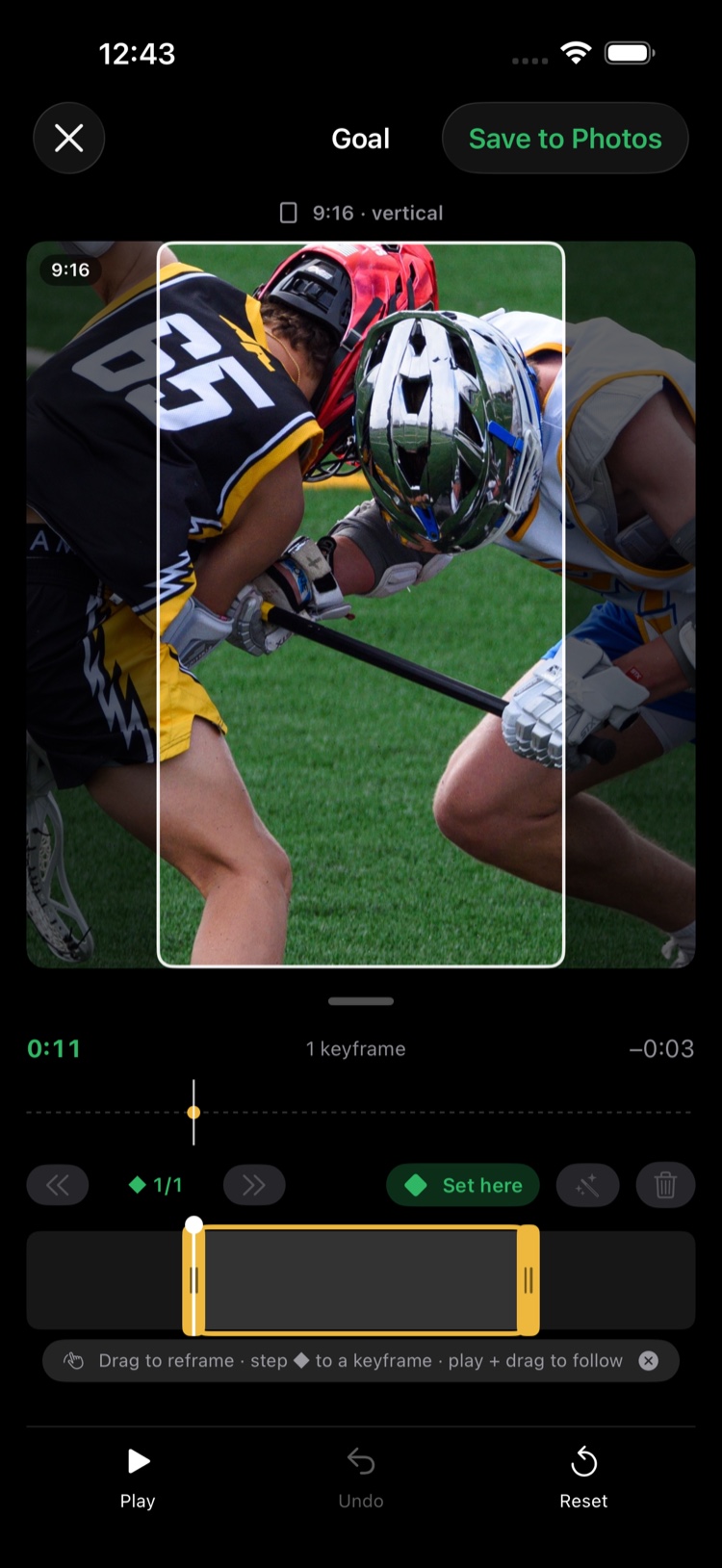
- The action moves, so the frame can follow it: press play and keep dragging to stay with the play. ClipPin records the path as you go, adding a keyframe each time.
- Not quite right? Scrub to the spot and drag again, or use the keyframe row — ⟨⟨ and ⟩⟩ step between keyframes, ◆ n/N shows where you are, Add keyframe pins the framing at that exact moment, and Delete removes one. With more than a few keyframes, Simplify (in the time row) smooths the path out.
- Pinch to zoom in closer. Zoomed clips get an automatic quality boost on the way out.
- Tap Save to Photos (top right). The tall version saves alongside your widescreen one — you keep both.
Like everything in the editor, the framing is saved. Come back later and adjust it without starting over.
Not on a pass yet? See Your Free Week and the Passes for what's included.
Next: Trim a Clip · Share Clips and the Postgame Recap
Still stuck? Email us at hello@getclippin.com.